
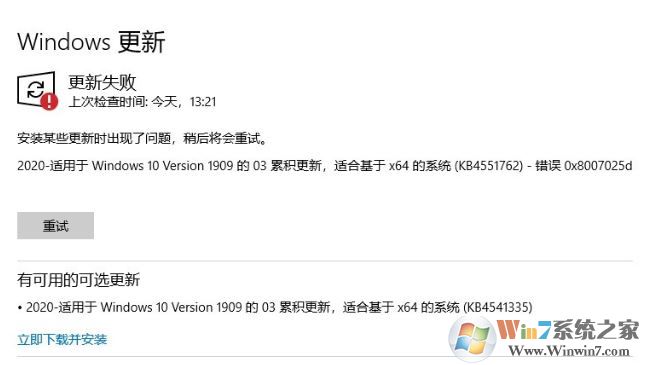
win10 KB4551762更新失败 错误代码:0x8007025d 错误代码的解决方法
1、尝试运行 “DiagPackage.diagpkg”
C:\Windows\diagnostics\system\WindowsUpdate\DiagPackage.diagpkg
=================================
2、如果以上不行,试试按查找 》powershell》 右键 》 用管理员运行 》 把下面的命令拷贝到里面 》 运行 》 运行完后重启电脑:
$arch = Get-WMIObject -Class Win32_Processor -ComputerName LocalHost | Select-Object AddressWidth
Write-Host "1. Stopping Windows Update Services..."
Stop-Service -Name BITS
Stop-Service -Name wuauserv
Stop-Service -Name appidsvc
Stop-Service -Name cryptsvc
Write-Host "2. Remove QMGR Data file..."
Remove-Item "$env:allusersprofile\Application Data\Microsoft\Network\Downloader\qmgr*.dat" -ErrorAction SilentlyContinue
Write-Host "3. Renaming the Software Distribution and CatRoot Folder..."
Rename-Item $env:systemroot\SoftwareDistribution SoftwareDistribution.bak -ErrorAction SilentlyContinue
Rename-Item $env:systemroot\System32\Catroot2 catroot2.bak -ErrorAction SilentlyContinue
Write-Host "4. Removing old Windows Update log..."
Remove-Item $env:systemroot\WindowsUpdate.log -ErrorAction SilentlyContinue
Write-Host "5. Resetting the Windows Update Services to defualt settings..."
"sc.exe sdset bits D:(A;;CCLCSWRPWPDTLOCRRC;;;SY)(A;;CCDCLCSWRPWPDTLOCRSDRCWDWO;;;BA)(A;;CCLCSWLOCRRC;;;AU)(A;;CCLCSWRPWPDTLOCRRC;;;PU)"
"sc.exe sdset wuauserv D:(A;;CCLCSWRPWPDTLOCRRC;;;SY)(A;;CCDCLCSWRPWPDTLOCRSDRCWDWO;;;BA)(A;;CCLCSWLOCRRC;;;AU)(A;;CCLCSWRPWPDTLOCRRC;;;PU)"
Set-Location $env:systemroot\system32
Write-Host "6. Registering some DLLs..."
regsvr32.exe /s atl.dll
regsvr32.exe /s urlmon.dll
regsvr32.exe /s mshtml.dll
regsvr32.exe /s shdocvw.dll
regsvr32.exe /s browseui.dll
regsvr32.exe /s jscript.dll
regsvr32.exe /s vbscript.dll
regsvr32.exe /s scrrun.dll
regsvr32.exe /s msxml.dll
regsvr32.exe /s msxml3.dll
regsvr32.exe /s msxml6.dll
regsvr32.exe /s actxprxy.dll
regsvr32.exe /s softpub.dll
regsvr32.exe /s wintrust.dll
regsvr32.exe /s dssenh.dll
regsvr32.exe /s rsaenh.dll
regsvr32.exe /s gpkcsp.dll
regsvr32.exe /s sccbase.dll
regsvr32.exe /s slbcsp.dll
regsvr32.exe /s cryptdlg.dll
regsvr32.exe /s oleaut32.dll
regsvr32.exe /s ole32.dll
regsvr32.exe /s shell32.dll
regsvr32.exe /s initpki.dll
regsvr32.exe /s wuapi.dll
regsvr32.exe /s wuaueng.dll
regsvr32.exe /s wuaueng1.dll
regsvr32.exe /s wucltui.dll
regsvr32.exe /s wups.dll
regsvr32.exe /s wups2.dll
regsvr32.exe /s wuweb.dll
regsvr32.exe /s qmgr.dll
regsvr32.exe /s qmgrprxy.dll
regsvr32.exe /s wucltux.dll
regsvr32.exe /s muweb.dll
regsvr32.exe /s wuwebv.dll
Write-Host "7) Removing WSUS client settings..."
REG DELETE "HKLM\SOFTWARE\Microsoft\Windows\CurrentVersion\WindowsUpdate" /v AccountDomainSid /f
REG DELETE "HKLM\SOFTWARE\Microsoft\Windows\CurrentVersion\WindowsUpdate" /v PingID /f
REG DELETE "HKLM\SOFTWARE\Microsoft\Windows\CurrentVersion\WindowsUpdate" /v SusClientId /f
Write-Host "8) Resetting the WinSock..."
netsh winsock reset
netsh winhttp reset proxy
Write-Host "9) Delete all BITS jobs..."
Get-BitsTransfer | Remove-BitsTransfer
Write-Host "10) Attempting to install the Windows Update Agent..."
if($arch -eq 64){
wusa Windows8-RT-KB2937636-x64 /quiet
}
else{
wusa Windows8-RT-KB2937636-x86 /quiet
}
Write-Host "11) Starting Windows Update Services..."
Start-Service -Name BITS
Start-Service -Name wuauserv
Start-Service -Name appidsvc
Start-Service -Name cryptsvc
Write-Host "12) Forcing discovery..."
wuauclt /resetauthorization /detectnow
Write-Host "Process complete. Please reboot your computer."
完成命令运行后重启一次计算机即可正常更新KB4551762补丁号了~End