
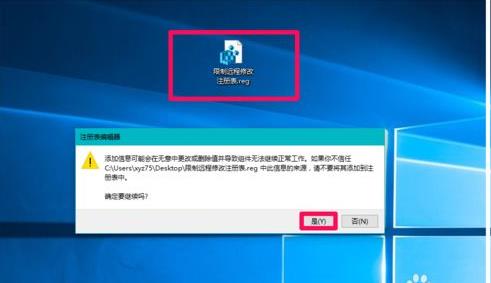
使用方法:
1、在记事本或新建文本文档中复制下面的注册表代码。自己保存为(***).reg 回车就一切OK了 Windows Registry Editor Version 5.00 ---------------------------------删除桌面右键ATI显卡管理选项 [-HKEY_CLASSES_ROOT\Directory\Background\shellex\ContextMenuHandlers\ACE] ---------------------------------开机启动项设置 [-HKEY_CURRENT_USER\Software\Microsoft\Windows\CurrentVersion\Run] [HKEY_CURRENT_USER\Software\Microsoft\Windows\CurrentVersion\Run] "QQ2009"="\"C:\\Program Files (x86)\\Tencent\\QQ\\Bin\\QQ.exe\" /background" "RocketDock"="\"C:\\Program Files (x86)\\RocketDock\\RocketDock.exe\"" [HKEY_LOCAL_MACHINE\SOFTWARE\Microsoft\Windows\CurrentVersion\Run] "AdobeAAMUpdater-1.0"=- "Adobe Updater Startup Utility"=- "RtHDVCpl"=- [HKEY_LOCAL_MACHINE\SOFTWARE\Wow6432Node\Microsoft\Windows\CurrentVersion\Run] "AdobeAAMUpdater-1.0"=- "Adobe Updater Startup Utility"=- "StartCCC"=- ---------------------------------隐藏导航栏 桌面 OneDrive Windows10 自带网盘 [-HKEY_CURRENT_USER\SOFTWARE\Microsoft\Windows\CurrentVersion\Explorer\Desktop\NameSpace\{018D5C66-4533-4307-9B53-224DE2ED1FE6}] [HKEY_CLASSES_ROOT\CLSID\{018D5C66-4533-4307-9B53-224DE2ED1FE6}\ShellFolder] "Attributes"=dword:f090004d ---------------------------------删除Windows10右键 使用Windows Defender扫描 [-HKEY_CLASSES_ROOT\Directory\shellex\ContextMenuHandlers\EPP] [-HKEY_CLASSES_ROOT\*\shellex\ContextMenuHandlers\EPP]
---------------------------------删除Windows10右键 还原以前版本 [-HKEY_CLASSES_ROOT\Directory\shellex\ContextMenuHandlers\{596AB062-B4D2-4215-9F74-E9109B0A8153}] [-HKEY_CLASSES_ROOT\AllFilesystemObjects\shellex\ContextMenuHandlers\{596AB062-B4D2-4215-9F74-E9109B0A8153}] ---------------------------------删除Windows10文件夹右键 固定到“快速访问” [-HKEY_CLASSES_ROOT\Folder\shell\pintohome] ---------------------------------清理Windows10应用商店后,删除残留的打开方式 [-HKEY_CLASSES_ROOT\Applications\LaunchWinApp.exe] ---------------------------------删除右键固定到任务栏 [-HKEY_CLASSES_ROOT\*\shellex\ContextMenuHandlers\{90AA3A4E-1CBA-4233-B8BB-535773D48449}] ---------------------------------StartIsBack右键 固定到开始菜单 [-HKEY_CLASSES_ROOT\CLSID\{a2a9545d-a0c2-42b4-9708-a0b2badd77c9}] ---------------------------------删除文件夹右键 包含到库中 [-HKEY_CLASSES_ROOT\Folder\shellex\ContextMenuHandlers\Library Location] ---------------------------------删除文件夹/硬盘右键 共享 [-HKEY_CLASSES_ROOT\Directory\shellex\ContextMenuHandlers\Sharing] [-HKEY_CLASSES_ROOT\Directory\background\shellex\ContextMenuHandlers\Sharing] [-HKEY_CLASSES_ROOT\*\shellex\ContextMenuHandlers\Sharing] ---------------------------------删除硬盘右键 启用Bitlocker [-HKEY_LOCAL_MACHINE\SOFTWARE\Classes\Drive\shell\encrypt-bde-elev] [-HKEY_LOCAL_MACHINE\SOFTWARE\Classes\Drive\shell\encrypt-bde] ---------------------------------删除硬盘右键 还原以前的版本 [-HKEY_LOCAL_MACHINE\SOFTWARE\Classes\Drive\shellex\ContextMenuHandlers\{596AB062-B4D2-4215-9F74-E9109B0A8153}] ---------------------------------删除 固定到开始屏幕 [-HKEY_LOCAL_MACHINE\SOFTWARE\Classes\Folder\shellex\ContextMenuHandlers\PintoStartScreen] [-HKEY_LOCAL_MACHINE\SOFTWARE\Classes\Folder\shell\pintostartscreen] [-HKEY_CLASSES_ROOT\exefile\shellex\ContextMenuHandlers\PintoStartScreen] [-HKEY_CLASSES_ROOT\exefile\shell\pintostartscreen] ---------------------------------删除图像、音频、视频及其他格式右键 播放到设备 [-HKEY_CLASSES_ROOT\SystemFileAssociations\image\shellex\ContextMenuHandlers\PlayTo] [-HKEY_CLASSES_ROOT\SystemFileAssociations\audio\shellex\ContextMenuHandlers\PlayTo] [-HKEY_CLASSES_ROOT\SystemFileAssociations\video\shellex\ContextMenuHandlers\PlayTo] [-HKEY_CLASSES_ROOT\SystemFileAssociations\.mkv\shellex\ContextMenuHandlers\PlayTo] [-HKEY_CLASSES_ROOT\SystemFileAssociations\.mp4\shellex\ContextMenuHandlers\PlayTo] [-HKEY_CLASSES_ROOT\SystemFileAssociations\.m4v\shellex\ContextMenuHandlers\PlayTo] [-HKEY_CLASSES_ROOT\SystemFileAssociations\Directory.Audio\shellex\ContextMenuHandlers\PlayTo] [-HKEY_CLASSES_ROOT\SystemFileAssociations\Directory.Image\shellex\ContextMenuHandlers\PlayTo] [-HKEY_CLASSES_ROOT\SystemFileAssociations\Directory.Video\shellex\ContextMenuHandlers\PlayTo] ---------------------------------以Windows传统图片查看器打开Jpg等格式图片 [HKEY_CURRENT_USER\Software\Classes\.psd] @="PhotoViewer.FileAssoc.Tiff" [HKEY_CURRENT_USER\Software\Classes\.ico] @="PhotoViewer.FileAssoc.Tiff" [HKEY_CURRENT_USER\Software\Classes\.jpg] @="PhotoViewer.FileAssoc.Tiff" [HKEY_CURRENT_USER\Software\Classes\.png] @="PhotoViewer.FileAssoc.Tiff" ---------------------------------删除右键exe程序等的“兼容性疑难解答” [-HKEY_CLASSES_ROOT\batfile\ShellEx\ContextMenuHandlers\Compatibility] [-HKEY_CLASSES_ROOT\cmdfile\ShellEx\ContextMenuHandlers\Compatibility] [-HKEY_CLASSES_ROOT\exefile\shellex\ContextMenuHandlers\Compatibility] [-HKEY_CLASSES_ROOT\lnkfile\shellex\ContextMenuHandlers\Compatibility] [-HKEY_CLASSES_ROOT\Msi.Package\shellex\ContextMenuHandlers\Compatibility] ---------------------------------文件右键添加 移动/复制到文件夹 [HKEY_CLASSES_ROOT\AllFilesystemObjects\shellex\ContextMenuHandlers\{C2FBB630-2971-11D1-A18C-00C04FD75D13}] [HKEY_CLASSES_ROOT\AllFilesystemObjects\shellex\ContextMenuHandlers\{C2FBB631-2971-11D1-A18C-00C04FD75D13}] ---------------------------------移除注册表确认对话框 [HKEY_CLASSES_ROOT\regfile\shell\open\command] @="regedit.exe /s \"%1\"" ---------------------------------默认以快捷方式安装字体 [HKEY_CURRENT_USER\Software\Microsoft\Windows NT\CurrentVersion\Font Management] "InstallAsLink"=dword:00000001 ---------------------------------直观显示空文件夹的图标更改 [-HKEY_LOCAL_MACHINE\SOFTWARE\Microsoft\Windows\CurrentVersion\Explorer\Shell Icons] [HKEY_LOCAL_MACHINE\SOFTWARE\Microsoft\Windows\CurrentVersion\Explorer\Shell Icons] "3"="%SystemRoot%\\system32\\imageres.dll,5" ---------------------------------隐藏桌面 我的电脑,我的文档,网络,回收站等图标 [HKEY_CURRENT_USER\Software\Microsoft\Windows\CurrentVersion\Explorer\HideDesktopIcons\NewStartPanel] "{645FF040-5081-101B-9F08-00AA002F954E}"=dword:00000001 "{59031a47-3f72-44a7-89c5-5595fe6b30ee}"=dword:00000001 "{20D04FE0-3AEA-1069-A2D8-08002B30309D}"=dword:00000001 "{F02C1A0D-BE21-4350-88B0-7367FC96EF3C}"=dword:00000001 "{5399E694-6CE5-4D6C-8FCE-1D8870FDCBA0}"=dword:00000001 ---------------------------------删除少数使用的文件新建菜单 [-HKEY_CLASSES_ROOT\.docx\WPS.Docx.6] [-HKEY_CLASSES_ROOT\.pptx\WPP.PPTX.6] [-HKEY_CLASSES_ROOT\.xlsx\ET.Xlsx.6] [-HKEY_CLASSES_ROOT\.xdp\ShellNew] [-HKEY_CLASSES_ROOT\.as\ShellNew] [-HKEY_CLASSES_ROOT\.cpt\ShellNew] [-HKEY_CLASSES_ROOT\.contact\ShellNew] [-HKEY_CLASSES_ROOT\.jnt\jntfile\ShellNew] [-HKEY_CLASSES_ROOT\.zip\ShellNew] [-HKEY_CLASSES_ROOT\.ac6\ShellNew] [-HKEY_CLASSES_ROOT\Briefcase\ShellNew] [-HKEY_CLASSES_ROOT\.vnd\ShellNew] [-HKEY_CLASSES_ROOT\.rtf\ShellNew] [-HKEY_CLASSES_ROOT\.glr\ShellNew] ---------------------------------去除“快捷方式”字样的后缀 [HKEY_CURRENT_USER\Software\Microsoft\Windows\CurrentVersion\Explorer] "link"=hex:00,00,00,00 ---------------------------------右键功能拓展,用记事本打开 [HKEY_CLASSES_ROOT\*\shell\Notepad] @="用记事本打开" "Extended"="" "icon"="imageres.dll,97" [HKEY_CLASSES_ROOT\*\shell\Notepad\command] @=hex(2):6e,00,6f,00,74,00,65,00,70,00,61,00,64,00,20,00,25,00,31,00,00,00 ---------------------------------右键功能拓展,管理员取得所有权 [HKEY_CLASSES_ROOT\*\shell\runas] @="管理员取得所有权" "NoWorkingDirectory"="" "Extended"="" "Icon"="imageres.dll,77" [HKEY_CLASSES_ROOT\*\shell\runas\command] @="cmd.exe /c takeown /f \"%1\" && icacls \"%1\" /grant administrators:F" "IsolatedCommand"="cmd.exe /c takeown /f \"%1\" && icacls \"%1\" /grant administrators:F" [HKEY_CLASSES_ROOT\exefile\shell\runas2] @="管理员取得所有权" "NoWorkingDirectory"="" "Extended"="" "Icon"="imageres.dll,77" [HKEY_CLASSES_ROOT\exefile\shell\runas2\command] @="cmd.exe /c takeown /f \"%1\" && icacls \"%1\" /grant administrators:F" "IsolatedCommand"="cmd.exe /c takeown /f \"%1\" && icacls \"%1\" /grant administrators:F" [HKEY_CLASSES_ROOT\Directory\shell\runas] @="管理员取得所有权" "NoWorkingDirectory"="" "Extended"="" "Icon"="imageres.dll,77" [HKEY_CLASSES_ROOT\Directory\shell\runas\command] @="cmd.exe /c takeown /f \"%1\" /r /d y && icacls \"%1\" /grant administrators:F /t" "IsolatedCommand"="cmd.exe /c takeown /f \"%1\" /r /d y && icacls \"%1\" /grant administrators:F /t" ---------------------------------安装多版本CorelDRAW 后,删除CDR文件右键Import选项 [-HKEY_CLASSES_ROOT\CorelDraw.Graphic.17\shell\Import]
---------------------------------删除右键 上传到WPS云文档 [-HKEY_CLASSES_ROOT\CLSID\{67F4D210-BFC2-4ADD-9A2A-C9B9E1F42C4F}] [-HKEY_CLASSES_ROOT\lnkfile\shellex\ContextMenuHandlers\qingshellext] [-HKEY_CURRENT_USER\Software\Classes\*\ShellEx\ContextMenuHandlers\qingshellext] [-HKEY_CURRENT_USER\Software\Classes\Directory\shellex\ContextMenuHandlers\qingshellext] ---------------------------------安装WPS后 删除硬盘右键数据恢复 [-HKEY_LOCAL_MACHINE\SOFTWARE\Classes\Drive\shellex\ContextMenuHandlers\datamastershellext] [-HKEY_CLASSES_ROOT\CLSID\{645FF040-5081-101B-9F08-00AA002F954E}\shellex\ContextMenuHandlers\datamastershellext] ---------------------------------删除文档类文件Acrobat合并菜单 [-HKEY_CLASSES_ROOT\*\shellex\ContextMenuHandlers\Adobe.Acrobat.ContextMenu] [-HKEY_LOCAL_MACHINE\SOFTWARE\Classes\Folder\shellex\ContextMenuHandlers\Adobe.Acrobat.ContextMenu] ---------------------------------图标制作工具注册 Axialis IconWorkshop [HKEY_CURRENT_USER\SOFTWARE\Axialis\IconWorkshop\registration] "UserFullName"="Art.Xiaolu" "UserCompany"="Art.XiaoLu" "ProductKey"="21010740-13651-56702-17440-55483" 我随时关注你们的复制 ---------------------------------删除百度云右键 [-HKEY_CLASSES_ROOT\Directory\shellex\ContextMenuHandlers\YunShellExt] [-HKEY_CLASSES_ROOT\*\ShellEx\ContextMenuHandlers\YunShellExt] ---------------------------------删除迅雷影音右键 [-HKEY_CLASSES_ROOT\*\ShellEx\ContextMenuHandlers\AXmp] [-HKEY_CURRENT_USER\Software\Microsoft\Windows\CurrentVersion\Explorer\FileExts\ ] [-HKEY_CLASSES_ROOT\ ] ---------------------------------RocketDock工具栏 StackDocklet 选项设置 [HKEY_CURRENT_USER\SOFTWARE\StackDocklet] "OpenFolderText"="打 - 开" "DMoreText"="" "FontName"="Segoe UI Semibold" "FontSize"=dword:00000008 "FontBold"=dword:00000000 "FollowDock"=dword:00000001 ----------------------------------更改图像文件Picasa文件默认图标 [HKEY_CLASSES_ROOT\Google.PhotoViewer.3.0\DefaultIcon] @="imageres.dll,65" ---------------------------------三款Boilsoft视频工具注册 [HKEY_CURRENT_USER\Software\Boilsoft\Boilsoft Video Converter] "test"=hex:c3,26,d3,54,00,00,00,00,ee,26,d3,54,00,00,00,00,0d,00,00,00,0e,01,\ 00,00 "usr"="Derrick Roberts" "sn"="46DC7F41-0233275F-84B73071-544F974F-4B39F43A-697DB4F7-7300" [HKEY_CURRENT_USER\Software\Boilsoft\Boilsoft Video Joiner] "test"=hex:c4,c3,66,51,00,00,00,00,08,25,d3,54,00,00,00,00,0c,00,00,00,1a,62,\ 6c,03 "sn"="B26FFDF1-FB339F72-8AA6B34A-4C9F3AD5-A5F67B03-A1C59948-CDAB" "usr"="Voronezh_Team_2020" [HKEY_CURRENT_USER\Software\Boilsoft\Boilsoft Video Splitter] "test"=hex:a6,80,5f,51,00,00,00,00,40,25,d3,54,00,00,00,00,01,00,00,00,e1,a4,\ 73,03 "usr"="Voronezh_Team_2020" "sn"="0857373E-8264B0E6-2E9C022D-F5C55C0C-9FDFEF74-6F737A3C-E690" ---------------------------------Chrome 取消Windows 8 模式启动 [HKEY_CURRENT_USER\Software\Google\Chrome\Metro] "launch_mode"=dword:00000000 ---------------------------------对未知文件右键添加谷歌浏览器(谷歌Chrome)打开方式选项 [HKEY_CLASSES_ROOT\Applications\Chrome.exe\shell\open\command] @="\"C:\\Program Files (x86)\\Google\\Chrome\\Application\\chrome.exe\" \"%1\"" ---------------------------------百度云盘视频缓存预览播放系统之家www.winwin7.com [HKEY_CLASSES_ROOT\.downloading] "Content Type"="video/tdl" "PerceivedType"="video" @="downloading_auto_file" [HKEY_CLASSES_ROOT\downloading_auto_file] @="百度云盘缓存" [HKEY_CLASSES_ROOT\downloading_auto_file\DefaultIcon] @="D:\\文 - 档\\icon\\云盘缓存.ico" [HKEY_CLASSES_ROOT\downloading_auto_file\shell\open\command] @="\"C:\\Program Files (x86)\\SPlayer\\splayer.exe\" \"%1\"" ---------------------------------射手影音播放QQ旋风视频缓存 [HKEY_CLASSES_ROOT\.tdl] "Content Type"="video/tdl" "PerceivedType"="video" @="tdl_auto_file" [HKEY_CLASSES_ROOT\tdl_auto_file] @="QQ旋风缓存" [HKEY_CLASSES_ROOT\tdl_auto_file\DefaultIcon] @="D:\\文 - 档\\icon\\旋风缓存.ico" [HKEY_CLASSES_ROOT\tdl_auto_file\shell\open\command] @="\"C:\\Program Files (x86)\\SPlayer\\splayer.exe\" \"%1\"" ---------------------------------安装Photoshop后新建BMP文件 [HKEY_CLASSES_ROOT\.bmp] @="Paint.Picture" ---------------------------------删除文件右键格式工厂 [-HKEY_CLASSES_ROOT\*\shellex\ContextMenuHandlers\FormatFactoryShell] [-HKEY_CLASSES_ROOT\Directory\shellex\ContextMenuHandlers\FormatFactoryShell] ---------------------------------禁止Adobe服务项 [HKEY_LOCAL_MACHINE\SYSTEM\CurrentControlSet\Services\AdobeARMservice] "Start"=dword:00000004 [HKEY_LOCAL_MACHINE\SYSTEM\CurrentControlSet\Services\AdobeUpdateService] "Start"=dword:00000004 ---------------------------------安装多版本CorelDRAW 后,cdr打开方式列表选项 [HKEY_CURRENT_USER\Software\Microsoft\Windows\CurrentVersion\Explorer\FileExts\.cdr\OpenWithProgids] "CorelDraw.Graphic.14"=hex(0): "CorelDraw.Graphic.17"=hex(0): "CorelDraw.Graphic.18"=hex(0): [-HKEY_CLASSES_ROOT\CorelDraw.Graphic.14\shell\Import] ---------------------------------停止WMP网络共享媒体库 [HKEY_LOCAL_MACHINE\SYSTEM\CurrentControlSet\Services\WMPNetworkSvc] "Start"=dword:00000004 ---------------------------------删除字体管家右键 [-HKEY_CLASSES_ROOT\fonfile\shell\使用 字体管家 安装字体] [-HKEY_CLASSES_ROOT\ttcfile\shell\使用 字体管家 安装字体] [-HKEY_CLASSES_ROOT\ttffile\shell\使用 字体管家 安装字体] ---------------------------------删除未知文件右键opendlg [-HKEY_CLASSES_ROOT\Unknown\shell\opendlg] ---------------------------------删除CAD右键发布DWF文件www.winwin7.com [-HKEY_CLASSES_ROOT\*\ShellEx\ContextMenuHandlers\Autodesk.DWF.ContextMenu] ---------------------------------删除 UltraISO 文件夹 右键选项 [-HKEY_CLASSES_ROOT\Directory\shellex\ContextMenuHandlers\UltraISO] [-HKEY_LOCAL_MACHINE\SOFTWARE\Classes\Folder\ShellEx\ContextMenuHandlers\UltraISO] ---------------------------------删除 MP3TAG 音乐编辑工具 文件夹 右键选项 [-HKEY_LOCAL_MACHINE\SOFTWARE\Classes\Directory\shellex\ContextMenuHandlers\Mp3tagShell] [-HKEY_LOCAL_MACHINE\SOFTWARE\Classes\Drive\shellex\ContextMenuHandlers\Mp3tagShell] [-HKEY_CLASSES_ROOT\*\ShellEx\ContextMenuHandlers\Mp3tagShell] -----------------------------清理右键pintostartscreen [-HKEY_CLASSES_ROOT\*\shell\pintostartscreen] [-HKEY_CLASSES_ROOT\exefile\shell\pintostartscreen] [-HKEY_CLASSES_ROOT\Folder\shell\pintostartscreen] [-HKEY_CLASSES_ROOT\mscfile\shell\pintostartscreen] ---------------------------------删除硬盘Acronis右键备份还原 [-HKEY_LOCAL_MACHINE\SOFTWARE\Classes\Drive\shellex\ContextMenuHandlers\{C539A15A-3AF9-4c92-B771-50CB78F5C751}] ---------------------------------清除 Adobe Bridge 文件夹右键预览 [-HKEY_LOCAL_MACHINE\SOFTWARE\Classes\Directory\shell\Bridge]
制作成reg文件之后双击导入即可。End